Phone Box.

These .dds files are not new they are altered ones,
so you can substitute the Blue RtR 029komb.dds, for Red or Yellow Box's/Booth's on your layout.
Credits: Me - Gnome.
File location: C:\Program Files\BrainBombers\Rule the Rail!\Scenes\gyar
Note: Back-Up/Re-Name the old one before you put this in the folder.
Terrain.

Terrains. You can use different terrains for your layouts,
as in if you are doing desert layouts you can alter a copy of the tarrain and use it for that layout.
This works well with Willi's Layout Viewer.
Credits: Traeumer (Dreamer).
File location: C:\Program Files\BrainBombers\Rule the Rail!\objects\bitmaps
Note: Back-Up/Re-Name the old one before you put this in the folder.
Terrain.

Terrain. Willi has done a new terrains for your layouts.
This works well with his Layout Viewer.
Credits: Willi | Tomi.
File location: C:\Program Files\BrainBombers\Rule the Rail!\objects\bitmaps
Note: Back-Up/Re-Name the old one before you put this in the folder.
Grass & Sidewalk Terrain.

LovesConrail. aka Ron.
‘Here are some new textures I made.
Sometimes I have wanted a sidewalk only half the size of the original,
so I made these textures.
I must thank Dale for the idea as he made a half sidewalk item first and gave me the idea for this.
So thanks Dale..’
There are 4 tiles in this zip file.
Credits: LovesConrail. aka Ron.
File location: C:\Program Files\BrainBombers\Rule the Rail!\objects\bitmaps\terrain.jpg
Note: Back-Up/Re-Name the old one before you put this in the folder.
Dirt Road Crossing.

Dale
‘It has always bugged me that there is a terrain option for when a paved road crosses another paved road, but not for when two dirt roads crossed. So...,
Credits: Dale.
File location: C:\Program Files\BrainBombers\Rule the Rail!\objects\bitmaps\terrain.jpg
Note: Back-Up/Re-Name the old one before you put this in the folder.
Track3_Unballasted.

Dale.
‘The file is named track3_Unballasted.dds.
To install it,
go to your RtR! folder,
open the objects folder and the bitmaps folder in it.
Locate the file track3.dds and either rename it or move it to a safe place in case you want to restore it later.
Then copy track3_Unballasted.dds to the same folder and rename it to track3.dds.
Remember, this will work with ALL track regardless of where it is located.
You can't have some ballasted and some unballasted..’
Credits: Dale.
File location: C:\Program Files\BrainBombers\Rule the Rail!\objects\bitmaps
Note: Back-Up/Re-Name the old one before you put this in the folder.
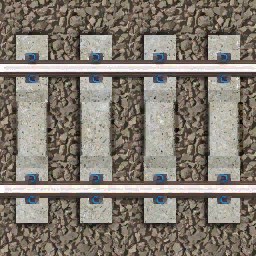
Track3_Concrete.
Billyb.
‘Modern era layouts need modern era track, so here is my attempt at concrete sleepers and Pandrol clips.’
Credits: Billyb.
File location: C:\Program Files\BrainBombers\Rule the Rail!\objects\bitmaps
Note: Back-Up/Re-Name the old one before you put this in the folder.
Track3 based on Marklin C Rails.

Ronald Van Den Bos has done this skin replacement for the Track3 it is based on the Marklin C Rails.
Thank You Ronald for this nice new addition.
Credits: Ronald Van Den Bos.
File location: C:\Program Files\BrainBombers\Rule the Rail!\objects\bitmaps
Note: Back-Up/Re-Name the old one before you put these in the folder.
Foot Note: Check out his other Skins.
Trackselect.

Ronald Van Den Bos has done this skin replacement for the Trackselect.
Thank You Ronald for this nice new addition.
Credits: Ronald Van Den Bos.
File location: C:\Program Files\BrainBombers\Rule the Rail!\objects\bitmaps
Note: Back-Up/Re-Name the old one before you put these in the folder.
Foot Note: Check out his other Skins.
Trackselect.

This Is for showing which way the polarity of the track is when a power supply is put on it.
In the zip file there are 2 bmp and 4 .dds files,
the bmp files are for the earlier RtR.
Yes you guessed it the .dds files are for the latter, 1.3 and up i think ?
Credits: Governor of Waldovia. & Peter for the Arrow one.
File location: C:\Program Files\BrainBombers\Rule the Rail!\objects\bitmaps
Note: Back-Up/Re-Name the old one before you put this in the folder.
01gycso3.

You can re-place the RtR tank logo with any of 4 new ones to match your layout theme.
Credits: Me - Gnome.
File location: C:\Program Files\BrainBombers\Rule the Rail!\objects\bitmaps
Note: Back-Up/Re-Name the old one before you put this in the folder.
noveny.

Re-place the noveny.dds to give your layouts a winter/snow effect.
Credits: Neil..
File location: C:\Program Files\BrainBombers\Rule the Rail!\Scenes\ember
Note: Back-Up/Re-Name the old one before you put this in the folder.

RTR Bridge Modified.

Some times the Standard / Default setting for the Rule The Rail! Bridge just looks out of place for your layout.
Why not re-place the rtr_bridge.dds to give your layouts a
cut-down bridge effect.
Credits: Traeumer (Dreamer).
File location: C:\Program Files\BrainBombers\Rule the Rail!\objects\bitmaps
Note: Back-Up/Re-Name the old one before you put this in the folder.